


Monday, September 22, 2008
Working With An Advantage - The HTC Advantage 7510 That Is
Posted by Don Tolson in "Pocket PC Hardware" @ 09:00 AM
Applications
The package of applications supplied with the Advantage is equally impressive and reflects the focus on the mobile professional. Included:
- Adobe Reader LE
- Audio Booster (bass booster for headphones only)
- HTC's Audio Manager (Windows Media Replacement, but audio only)
- ClearVuePresenter 5 (PowerPoint through the video port)
- Google Maps
- Java
- Jetcet Print 5 (print directly from the PDA)
- Opera 9.5 (beta version of browser replacement)
- SIM Manager (update contact information on your SIM card)
- Voice Speed Dial
- World Card Mobile (take a picture of a business card, then transfer the information to your Contacts list)
- ZIP
As with the hardware accessories, HTC has included software to take full advantage of the features of the 7510. For those professionals doing presentations on the go, ClearVuePresenter did a very good job driving all the projectors I tried it with. The big plus on HTC's video output cable was the inclusion of both VGA, composite Video, and S-Video output.
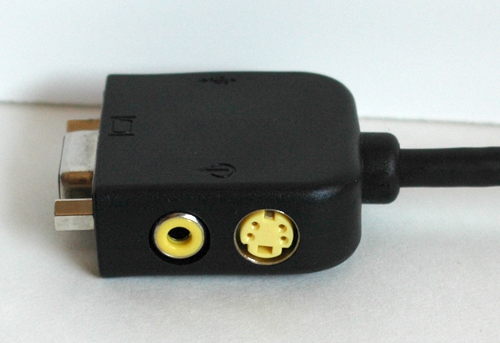
Figure 13: Here are the composite and S-video output jacks on the included video output cable. The standard VGA output is located on the left end.
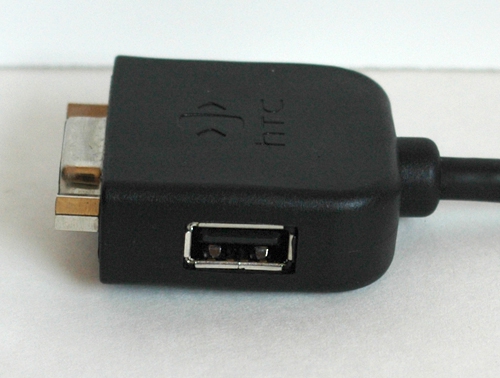
Figure 14: On the other side of the output end of the cable, there's even a USB output jack.
Content on the slides were as clear as any VGA output from a laptop, and the animations were relatively smooth. I suspect that moving around a lot of bigger graphics might get a bit chunky, but I generally keep mine simple and small.
Google Maps was disappointing in that I couldn't get it to work with the imbedded GPS unit at all. (More on this in the Radios section of the review). Unfortunately, due to a lack of cell towers in my area, triangulation via GSM connections placed me either in a lagoon 4 miles away or in the middle of the Juan de Fuca Strait!
Likewise, the Opera 9.5 browser was not really ready for primetime. Granted, this was a beta version, and I'm not a regular Opera user, so there was a bit of a learning curve for me as I tried to figure out the intricacies of the interface. But there were a lot of frozen screens and a couple of crashes (soft resets) as I was browsing my usual set of favorite websites.
World Card Mobile is an interesting concept. The idea is to take a picture of someone's business card with the camera, then use the software to identify the parts where contact information is located. It then uses Optical Character Recognition to transfer the info into an entry in the Contacts database. For me though, there was just too much fiddling required to get it to read anything on the cards. It's much faster for me to just type the stuff into a new Contacts entry.
The version of Office Mobile provided included the usual suspects -- Excel, PowerPoint and Word -- but also included OneNote Mobile, which we don't often see included in an OEM package.
The 16Gb Flash Drive on our demo unit came with garbage in the MyDocuments folder and a demo copy of ExtremeAgenda, which wouldn't install properly. I'm not sure if the production version of the 7510 comes with ExtremeAgenda, but I did look it up. It's available from Birdsoft , and is a pretty interesting looking PIM replacement.
Wanting to clean things up a bit for Jason, I eventually found the formatting utility for the flash drive, but it was a little counter-intuitive for those of us used to HTC devices. It's a new function in the ClearStorage utility provided by HTC. Normally, this application does a hard reset of your device, but HTC has modified it to provide a format utility for the flash drive only.
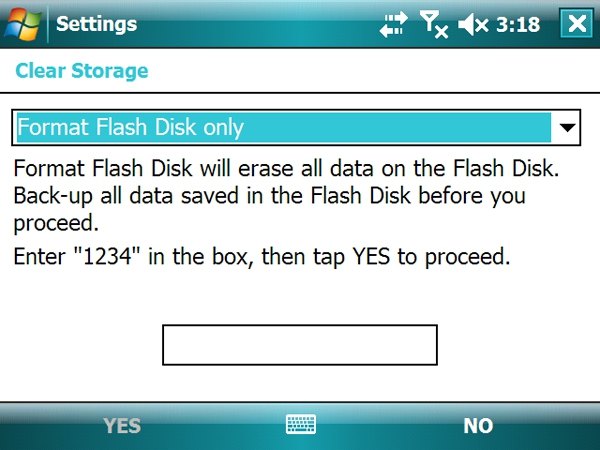
Figure 15: A screenshot of the updated Clear Storage utility provided by HTC for the Advantage 7510. The dropdown list provides options for clearing the entire unit (a hard reset) or just formatting the Flash Drive.
The phone... yes, there is a fully functioning quad-band GSM phone in the 7510, but it's not really integrated into the design. There's no earpiece on the display unit, which is way too big to hold up to the side of your head anyway. The only way to listen to incoming calls is by plugging in the headset/mic, through a bluetooth headset, or via the loudspeaker built into the front panel. If you're using this in a cubicle, a bluetooth headset is almost a necessity, unless you're one of those types who likes to show off their executive status by conducting all your conversations via speakerphone. It's almost as if HTC added the phone functionality to provide connectivity, rather than communication (i.e. a way to stay connected to the Internet, rather than actually use the phone as a phone). There is a vibrate function available (to avoid disturbing a meeting, etc.) but this is only available through the keyboard, so it has to be attached to make this work.






