Windows Phone Thoughts - Daily News, Views, Rants and Raves

Be sure to register in our forums! Share your opinions, help others, and enter our contests.


Digital Home Thoughts

Loading feed...

Laptop Thoughts

Loading feed...

Android Thoughts

Loading feed...


All posts tagged "ewallet"


Thursday, October 14, 2010

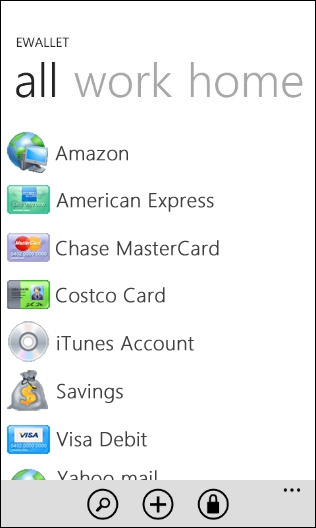
Ilium's eWallet Coming Soon for Windows Phone 7

Posted by Jason Dunn in "Windows Phone Software" @ 09:30 AM

http://blog.iliumsoft.com/2010/10/1...indows-phone-7/

"With the official Windows Phone 7 announcement going out yesterday, I wanted to let you know that we're working on a version of eWallet for Microsoft's new mobile OS! eWallet for Windows Phone 7 is designed to perfectly fit the look and feel of the new OS. It takes the best features of eWallet and adapts them to Window Phone 7's unique interface."

It's great to see a long-time Windows Phone developer like Ilium making a commitment to the new platform! What you might be asking yourself is how can a digital wallet program like this work without file sync? By putting a bullet in the head of ActiveSync/Windows Mobile Device Center, Microsoft broke the link between desktop/laptop and your Windows Phone. Given the buggy history of both of those products, some might view that as a good thing - yet, bugs and all, it was important for me as a user to be able to put files onto and pull them off of my device. Read more...


Tuesday, December 1, 2009

Ilium Releases eWallet 7

Posted by Ed Hansberry in "Windows Phone Software" @ 12:00 PM

http://www.iliumsoft.com/site/ew/ewallet.php

eWallet 7.0 is now shipping from Ilium Software. There are two really significant changes to the product and a bunch of minor ones. The first significant change is the desktop client is all new, rewritten from the ground up. I've been beta testing it now since the summer and in many areas, it is a substantial improvement over the 6.x build. I'll get into those changes in a minute.

eWallet 7

The second major change is pricing. You now only pay for eWallet one time. You no longer have to buy eWallet for your device. You buy eWallet for you. If you use an iPhone this week and switch to a Blackberry next month, you just download the new client for the Blackberry and enter your registration code. No more repurchasing when you change clients.

Now, on to the feature updates. Remember, this is mostly about the Windows client, but Windows Mobile users will see some welcome changes when syncing with a desktop client.

  • Totally new interface with an all new look that fits right at home with Vista's and Windows 7's Aero interface. You can revert to "classic" though if you prefer.
  • Auto-pass for Firefox users, something IE users have enjoyed for years.
  • Recenly opened cards list lets you quickly access those frequently used cards.
  • Full support for Windows 7. I'm running it on Win7 Ultimate x64 here.
  • All of the new graphics options designed on the desktop will sync over to your WinMo device.
  • Files attached on the desktop will sync over to a WinMo device. Don't get too carried away with this or you'll find yourself syncing a 50MB eWallet file.
  • WinMo 6.5 touchscreen users will be able to easily flip between cards on their device.

There is a free trial available. If you purchased eWallet 6.x between August 30 and today, you get 7.0 free. If you purchased it before then, you can upgrade for $10. If you don't own eWallet, it is only $19.99. There is a catch for users that purchased it through the WinMo Marketplace store or the iPhone App Store - those locations only sell device specific versions. You'll have to pay $10 to upgrade to the desktop client or to gain access to other platforms. One other side note: if you are still nursing a PalmOS device, be careful. There will be no eWallet 7 update for that platform and 6.x cannot read the 7.0 files.



Friday, July 18, 2008

eWallet 6.1 Released

Posted by Ed Hansberry in "Pocket PC Software" @ 06:00 AM

http://www.iliumsoft.com/site/ew/ew_61.php

"eWallet 6.1, released in July 2008, is the latest version of eWallet for Windows Mobile, Palm OS, Windows PCs, UMPCs and U3 Smart Drives."

This actually came out about a week or so ago and I have been so busy at work I neglected to post on it. I've been using it for about 2 months in various beta stages and as always, Ilium's betas are as stable or more stable than some released products. Nothing earth-shattering in this release, but a lot of niceties added that keep eWallet at the top of my list of apps to install on my desktop and Pocket PC. This is a free upgrade for 6.0 users. If you have 5.x or an earlier release, see the information on their web site for upgrade eligibility.

Favorites view

Some of the new features include:

  • Personalize your card fields to work best for you: assign a type to any field in a card. Set multiple hidden fields, phone numbers, live email or web links, choose which fields to use with AutoPass - any type of data you want!
  • Get quick access to your most-used cards: create card shortcuts and build a Favorites folder for the info you want to open fast.
  • Search smarter: the Find feature now gives you a list of all possible cards that match what you're looking for. This is my favorite new feature. It really helps when your eWallet file has well over 100 cards in it.
  • Work faster on a non-touch screen device: Windows Mobile Standard (Smartphone) users can now enjoy easier card editing on their devices.

Tags: ewallet

Reviews & Articles

Loading feed...

News

Loading feed...

Reviews & Articles

Loading feed...

News

Loading feed...

Reviews & Articles

Loading feed...

News

Loading feed...

Reviews & Articles

Loading feed...

News

Loading feed...

Reviews & Articles

Loading feed...

News

Loading feed...