


Thursday, March 12, 2009
Travelling with Pharos: A Review of the Traveler 117
Posted by Don Tolson in "Pocket PC Hardware" @ 09:00 AM
Day-to-Day Use
As I usually do in these reviews, I carried the Traveler 117 around with me for just over a week, using it as my day-to-day office companion for phone calls, emails, web browsing, organizer functions, etc. From a comfort point of view, the 117 is quite sleek and a good deal less bulky than my HTC Kaiser/Tilt. That's to be expected though, since it doesn't have a keyboard. The look and feel though is very professional, and I only found a couple of times when I really missed having the keyboard. As I noted before, using the trackball was a bit different, but because the software really wasn't written for it, I typically just flicked in the direction as a substitute for pressing a button on the Dpad. With a better ball and software written to take advantage of the variable capabilities, this could become a much more intuitive way of navigating.
Overall, I found the 117 to be surprisingly responsive. I didn't really look at the specs when I first got the unit and started using it, so it wasn't until I was doing some web browsing that I noticed the clarity of the images and text on the screen. I was shocked to discover this was a VGA screen, since I hadn't expected that on what I thought was an entry model. The VGA screen did a very good job with various YouTube entries I downloaded and the refresh rate made movement very fluid.
The volume the front speaker was good, certainly loud enough for use outside on the street. Music quality was OK, but a little tinny. What else can you really expect though?
All the applications I normally use during the day loaded and ran with no problems. The exception was OnCourse Navigator 8, but OCN has a history of having difficulties with different types of hardware.
I did notice that it seemed to take a long time to reload from a soft reset though -- sometimes between 30 to 45 seconds.
Radios
Pharos has taken no small pains to ensure the Traveler series is truly a world-capable phone. It's always a bit of a pain to get a hot new item from a manufacturer, only to find out some of the functionality will not work because the unit is built for the European or Asian market. Even better would be if we had global standards for communication bands, but let's not get started on that rant...
I'm pretty sure the 117 doesn't contain an FM radio to receive TMC updates. Although the Smart Navigator marketing describes updates to traffic info, I suspect this comes from Microsoft LiveSearch, rather than direct to the unit.
Cellular
As mentioned in the specifications, the Traveler 117 includes both quad band (850/900/1800/1900) GSM/GPRS/Edge, and tri-band (850/1900/2100) UMTS/HSDPA/HSUPA radios, which truly makes it a world phone, capable of working anywhere you take it. Unfortunately, we're seeing a tendency in other manufacturers to regionalize the upper data bands for European, Asian and North American markets. Kudos to Pharos for providing a fully-capable phone in a single package. Band selection is defaulted to auto-select, based on what is detected and available. As seen in the previous section, there is an application available to limit access to the higher speed (and sometimes higher cost) data bands, if desired. When the unit is first powered on after a hard reset, a utility runs which allows the user to select their cellular provider and have most of the parameters and settings configured for them. There is a also manual band/provider application available called AutoConfig, but it is located in the Programs menu, rather than the Phone Options menu where these things are normally found.
The interface to the phone is simple and straightforward, and the buttons are big enough to avoid mis-punches.
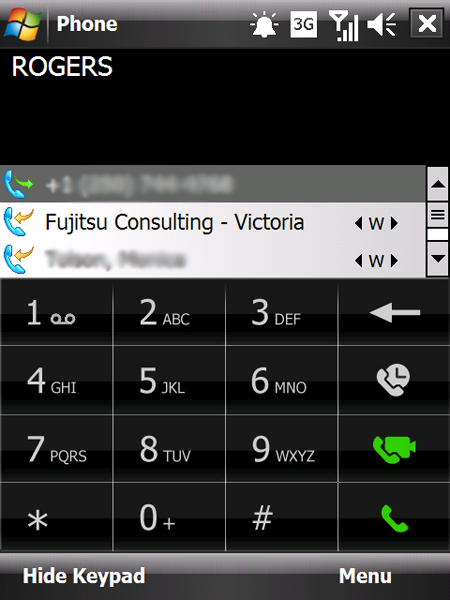
Figure 16: The Phone application interface on the Traveller 117.
The radio itself is about equal in sensitivity to similar units, showing the same number of bars as other smartphones and dedicated cell phones I use. The receiver in my review unit was a little scratchy, but none of my callers noticed anything, so the Pharos tech and I figured it must have been a loose wire or something. Overall voice quality was good, but the earpiece tended to give the callers' voices a tinny sound. Data transfers over the cellular radio seemed a bit faster and crisper than other units, especially on web browsing and emails.
Bluetooth
As with most smartphones coming out now, the Traveler 117's Bluetooth is fully 2.0 compliant with Enhanced Data Rate (EDR) support to provide transfers up to 3Mbit/sec. The 117 had no problems pairing with my Motorola HS820 Stereo Headphones, the Helium HD650 Headset or the Toyota Prius. Sound quality and range was good in all three situations, matching the capabilities of other phones I've tested. I did find the voice volume on the Helium headset to be the loudest I've ever encountered from any phone. I actually had to turn it down at the headset three or four notches to find a comfortable level which is definitely not a bad thing. I've long suffered voice call volumes on my headsets which were too low to be usuable in anything but a quiet office setting.
WiFi
The WiFi radio in the Traveler 117 is 802.11b and g compliant, so it easily connected into the D-Link Gigabit router at home. Connections were consistent and stable throughout. As I noted with the GPRS/Edge connections, web browsing and email downloads seemed to be faster and snappier on the 117 over other units I've tested. The range was also much better than my Kaiser or the HTC Touch Pro. The Traveler was able to keep the connection anywhere in my house, even through the myriad of forced-air heating pipes/plumbing/etc. that usually give these smaller recievers problems.
GPS
The built-in Qualcom GPS receiver in the 117 is a good deal more sensitive that either the HTC or the HP units I tested recently. From a cold start (soft reset), it was easily able to get a full position lock in under 20 seconds, inside my house, away from the windows. Clearly, Pharos has spent some time making sure they get this part right, since it is a major focus of the Traveler line. I'll include a more detailed look at Smart Navigator, the new name for Pharos' turn-by-turn navigation software, in a subsequent review. I took it out on a couple of runs around the city and out to a Scout camp in the country and it performed well, keeping a solid lock with no apparent lag in positioning as I drove around.
I also tried installing OnCourseNavigator 8 as a comparison, but it wouldn't work. I suspect it has something to do with OCN rather than the Traveler, since it couldn't even get past the initial splash screens, and OCN has reported problems working on other units as well.
Battery
While not enormous by current standards, the included 1410mAh battery is a good size for a unit like this and definitely required when powering a VGA screen. Pharos rates the battery at 7.5 hours of talk, 5 hours on video calls and 200 hours on standby. In my light to medium daily use (9 to 10 calls, some email, some GPS, about 1/2 hour of web browsing, then another 1/2 hour of Youtube) I never saw the battery go lower than 50%. Considering the VGA screen, that seems pretty amazing. The battery stayed cool in my hand and pocket for the entire day.
Pharos supplies the battery about 1/2 charged out of the box, but just to check, I ran it down and it took about 2 hours to recharge from a dead state. There was no mention of an extended battery available on the website.






