


Windows Phone Thoughts - Daily News, Views, Rants and Raves

Be sure to register in our forums! Share your opinions, help others, and enter our contests.


Digital Home Thoughts

Loading feed...

Laptop Thoughts

Loading feed...

Android Thoughts

Loading feed...


All posts tagged "desktop"


Monday, March 14, 2011

Windows Phone 7 UI For Your Desktop?

Posted by Brad Wasson in "Windows Phone Talk" @ 10:00 AM

http://lifehacker.com/#!5776891/win...phone-7-desktop

"Reader Gvannoorden took his dual monitor setup and created a Windows Phone 7 theme. A theme that could easily clutter a desktop fits in nicely thanks to the dual displays, keeping the information in the middle and leaving plenty of empty space for the desktop."
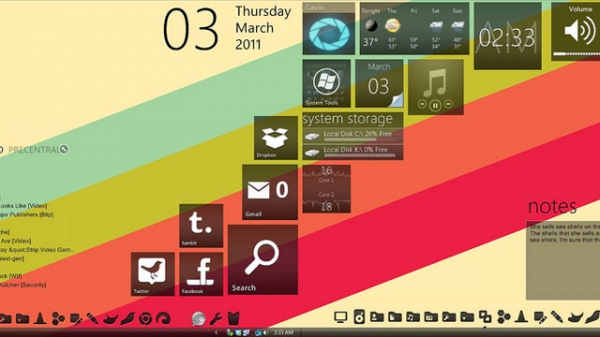
Here is a neat little project for you. Why not create a WP7-themed desktop for your home or work computer? This can be accomplished using a number of different tools. Hit the Read link for the details.

Wednesday, March 31, 2010

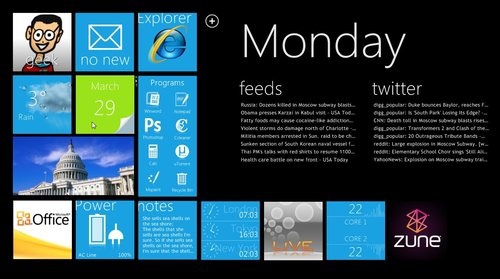
Experience Windows Phone 7 Series on your Windows Desktop with Omnimo UI

Posted by Eriq Cook in "Windows Phone Customizations & Content" @ 09:28 PM

http://www.engadget.com/2010/03/30/...h-phone-7-seri/

"Can't wait for Windows Phone 7 Series, but can't hack the emulator, either? Don't lose hope, Windows junkies -- you can still bring some semblance of WP7S order into your life with this Metro UI-inspired desktop HUD..."

Omnimo UI is an open-source Windows desktop customization tool based on Rainmeter, which will overlay your desktop with the look & feel of Windows Phone 7 Series. It's a pretty interesting tool and includes many useful widgets, shortcuts and "live" services including Gmail, Twitter, iTunes and more.

Omnimo UI is available for Windows XP, Vista and Windows 7. There's a detailed guide over at Lifehacker with desktop preparation and installation instructions.

Personally I've never installed a desktop customization tool and have to wonder how it affects overall Windows desktop performance. But I'm tempted to find a spare workstation and test it out (this wouldn't be a bad tool to use on a slate-style device).

Are any of you currently using Omnimo UI or plan on trying it out? Give us your feedback!


Tuesday, October 14, 2008

WisBar Advance Desktop Hits 2.0

Posted by Darius Wey in "Pocket PC Software" @ 11:12 AM

http://www.lakeridgesoftware.com/pr...AdvanceDesktop/

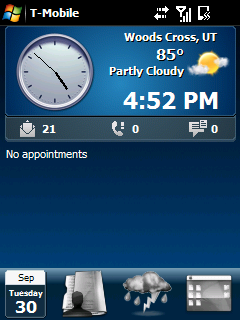
"WisBar Advance Desktop replaces your existing Today screen. Using WisBar Advance Desktop, you can create shortcuts, system meters, floating windows and virtual pages to extend the functionality of your Windows Mobile device. WisBar Advance Desktop also supports most existing Today plugins. You can arrange them on multiple pages in order to maximize their usefulness."

Pocket PC skinning and customization was all the rage a few years ago, but it seems to have died down as of late. That said, there still is a strong crowd of die-hard skinners out there, and if you happen to belong to that crowd, Lakeridge Software's latest release is for you. WisBar Advance Desktop 2 delivers a plethora of new features and enhancements, and costs $10.49 for v1.x users and $14.99 for new users.


Reviews & Articles

Loading feed...

News

Loading feed...

Reviews & Articles

Loading feed...

News

Loading feed...

Reviews & Articles

Loading feed...

News

Loading feed...

Reviews & Articles

Loading feed...

News

Loading feed...

Reviews & Articles

Loading feed...

News

Loading feed...




