


Friday, February 12, 2010
Seize the Day With the Samsung Intrepid from Sprint
Posted by Doug Raeburn in "Samsung Windows Phones" @ 07:30 AM
Using the Intrepid
Over the past few years, I've used a number of messenger style phones, among them a Samsung Blackjack, a Motorola Q9h and the Samsung Jack that I currently own, but the Intrepid's design is one I hadn't encountered before... a WM Professional device with a BlackBerry form factor, which gives it a touch screen that's found in only a small number of devices of this format currently available from US wireless providers. To a large degree, I found myself using the navigation pad and softkeys in lieu of the touch screen, probably because in that mode, the Intrepid works much like the Jack that I know and like very much. Another reason is that with the comparatively small touch screen, on screen controls are sometimes small and require the stylus to use them, unless a screen or application is designed to be finger friendly. As I discussed before, the Today screen and the primary menus of most applications have finger friendly designs, but secondary and settings screens retain their legacy stylus friendly designs. So you'll probably find yourself switching back and forth between the touch screen and the keyboard/directional pad/softkey modes of operation as different scenarios present themselves.
The touch screen itself is among the better resistive screens, in that its responsiveness is much like that of a capacitive screen while still providing the precision that's the hallmark of the resistive screen. On the home screen, within the contact list, in web browsers, etc., the Intrepid scrolls fluidly in response to finger swipes. You do have to be careful not to use too much pressure with your finger swipes or they might be interpreted as pressing the screen, which may result in selecting something when you only wanted to scroll. But after a couple of days of using the Intrepid, I got used to the touch screen and inadvertent selections became much less common.
Unlike other touch screen phones, the Intrepid doesn't include a large finger friendly onscreen keyboard because of the hardware keyboard (not to mention that such an onscreen keyboard would be impractical as it would nearly cover the whole screen). Aside from the slightly hollow feel of the keys, I like the keyboard a lot. Since the Intrepid is wider than the Jack, the keyboard is also slightly wider, and the improvement in typing accuracy is noticeable. The keys have a solid click and I like the matte finish on them... maybe it's my imagination, but the matte finish gives me a feeling of more solid connection with the keys when I type. The keyboard includes dedicated keys to bring up the Wireless Manager, Messaging (E-mail or Text Messaging) and to turn the speakerphone on and off during calls. Pressing and holding the Space key will put the phone in and out of Silent mode. There's also a dedicated key for TellMe, an application for voice dialing and other voice controlled activities. Overall, I consider the keyboard to be one of the Intrepid's most well designed features.
With the Intrepid's fine keyboard, there's little reason to consider using alternate input methods, but it includes the classic Block Recognizer, Letter Recognizer, QWERTY keyboard (for stylus use), Symbol Selector and Transcriber. Some people may prefer one or more of these stylus based input methods... Transcriber (handwriting recognition) in particular can be useful under some conditions.
The control keys and directional keypad above the keyboard all share the solid click action of the keyboard itself. And other than the brushed metal OK, Start and Enter keys, they all have the pleasant matte surface. The metal keys work fine and they can serve as guides to orient your fingers to use those keys without looking at them.
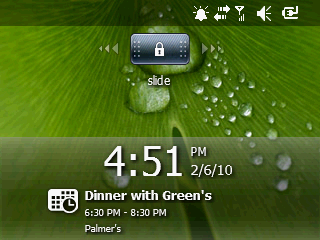
Figure 17: "Slide to unlock" controls are all the rage...
The Lock screen is MS' take on the iPhone's "slide to unlock" control. While the iPhone's control slides to the right only, the Intrepid's is centered on the top of the screen when locked and you can slide it either way. A nice touch is that your next appointment is displayed even while the phone is locked.
Making and Receiving Calls
To test the sound quality of the Intrepid, I did a few comparisons with my current work phone, a BlackBerry Bold 9700. In reviews, the 9700 has been judged as one of the best sounding phones currently available. First I called my number at work using each phone as a handset and let the call go to voice mail. The greeting sounded very clear on both phones. I also recorded a message with both phones.
Then I tried the same test using the speakerphone on each phone. While listening to the greeting, the 9700 was clear and just slightly tinny. The Intrepid broke up a bit while playing the greeting and it sounded more tinny than the 9700. I then checked my voice mail and the calls made with the handsets sounded great with both phones. The call made with the 9700's speakerphone was indistinguishable from the call made with the handset, while the Intrepid's sounded a bit tinny by comparison.
Finally, I engaged the help of a friend and made calls between the two phones. When using the handsets, both listening and talking quality was essentially a tie. When using the speakerphones, the 9700 once again outperformed the Intrepid when listening, with a fuller, less tinny sound. The Intrepid was still acceptable, just not up to the level of the 9700. Speaking through the speakerphone was much the same, with the Intrepid giving an acceptable but more tinny sounding performance as compared to the 9700.
Overall, I'd rate both phones as above average in handset performance. As speakerphones, the 9700 would still be rated above average, while the Intrepid would drop down a notch to average.
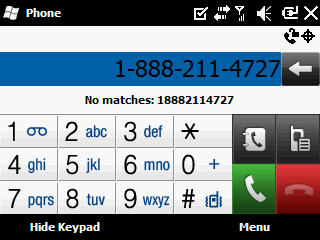
Figure 18: Your fingers will find this dialing screen very friendly...
As far as controls are concerned, this is where the Intrepid's touch screen is used to its greatest advantage. Dialing is simple enough on both phones with the numeric keypad present in the keyboard. But the Intrepid offers a phone keypad on its touch screen as well. Even though the screen itself is small, the keys on the keypad are large enough to be easily used with your fingers.
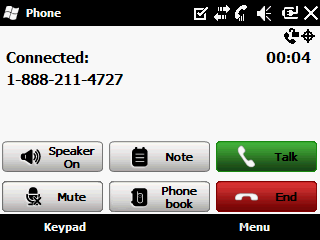
Figure 19: All the necessary controls to manage a connected call.
After connecting, the Intrepid's onscreen controls for mute and speaker are very convenient. Both the 9700 and the Intrepid can access these functions through a menu, but that's the only option for the 9700. Given both options, I'd go with the touch screen.






