


Friday, February 12, 2010
Seize the Day With the Samsung Intrepid from Sprint
Posted by Doug Raeburn in "Samsung Windows Phones" @ 07:30 AM
Lukewarm Reception to WM 6.5 Professional
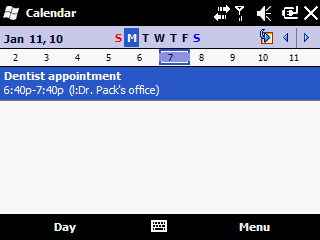
Figure 14: At first glance, the Calendar's Day view looks little changed.
If you keep abreast of tech news, you're probably aware that WM 6.5 Professional got a pretty tepid reception from the press. While it was recognized as a step in the right direction, it was criticized as a flashy "coat of paint" over the previous version of Windows Mobile. Much of the reason for that is that Microsoft wasn't quite ready to abandon the resistive touch screen optimized for a stylus that's been the foundation for Windows Mobile touch screen devices for years. They also weren't quite ready to replace all of the applications bundled with the devices, and most of those applications are more stylus friendly than finger friendly.
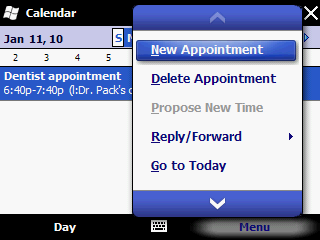
Figure 15: Large finger friendly menus are a step in the right direction.
When you go into many of the bundled applications, you'll find that Microsoft has replaced the primary menu, which previously was a stylus friendly design, with a more finger friendly design. So you'll see larger items on the menu with scroll arrows on the top and bottom, all of which are easy to access with a finger. The Calendar app in Figure 15 shows the improved menu.
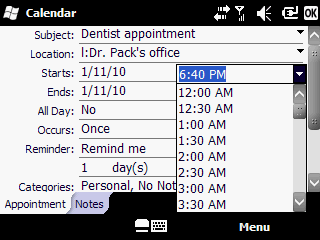
Figure 16: But older "stylus friendly" controls are also to be found.
However, they weren't able to upgrade all of the onscreen controls for this version of WM. Once you get past the new primary menu, you'll encounter controls such as the time selector shown in Figure 16. The items are too small to reliably hit with a fingertip, so this control is much easier to use with a stylus. Keep in mind that using a stylus isn't your only option here. When you reach this control, you could key the time in directly with the keyboard or navigate the dropdown using the directional keypad.
There are many other instances of similarly designed controls in the WM 6.5 apps, such as the day and week selectors shown near the top of Figure 14. As with the time selector, these controls are easily navigated with either the stylus or the directional pad. But the bottom line is that the experience falls somewhat short of the finger friendly environment so in demand these days in consumer devices. On the other hand, WM 6.5 maintains the platform's already strong business functionality (an area in which most seem to agree that it still remains ahead of consumer oriented devices like the iPhone) while adding finger friendliness, graphics embellishments and other consumer features for those who wish to or need to work AND play on a single device. WM's open architecture makes it much easier for developers to write complex applications as compared to the closed architecture of the iPhone. Features like developer access to the system databases and running tasks in the background are powerful tools available in WM and not with the iPhone.
Things Will Only Get Better
In fact, if you're looking for a better touch screen experience on WM devices, it appears that they already have gotten better. Right around the time during which I was writing this review, phones with an incremental upgrade to WM 6.5, tagged 6.5.3, made their debut at CES 2010. And while a point-point release doesn't sound like it would offer much, this one is far more substantial than you'd expect.
New and upgraded features include:
- An icon bar that expands by swiping the notification area at the top of the screen. It scrolls from side to side and adds large icons for searching, volume, battery, etc. that can access related functions (such as mute and power settings) in a finger friendly manner;
- Greatly expanded availability of finger friendly controls in bundled apps. For example, the linked video shows the improved design of the very same time selector that I highlighted in Figure 16. The new dropdown provides widely spaced choices that are easy to select with a finger, and it scrolls up and down easily;
- More finger friendly menus. In many apps, additional touch friendly menus have been added to ease access to a greater variety of commands;
- The Start menu allows icons to be moved around to any part of the screen, rather than just moved to the top of the screen as before;
- Multi-touch control is now available;
- A greatly improved onscreen keyboard, again very finger friendly.
More information is available on this site and on ZDNet.
Press reviews of this update have stated that had this been the version of WM 6.5 that was released back in October, it would have been much more warmly received. Samsung has been pretty good about providing incremental upgrades on their WM devices (my Jack had WM 6.1 when I got it and they upgraded it to WM 6.5), so perhaps the Intrepid will get the benefit of this upgrade as well. Only the folks at Samsung can speak to this however.






