


Thursday, August 20, 2009
No Job for Amateurs - HTC's Touch Pro2 Reviewed
Posted by Doug Raeburn in "Pocket PC Hardware" @ 07:00 AM
Bundled Software
The software bundled with the Touch Pro2 is pretty much the standard stuff… Office Mobile, a handful of games, a YouTube app, Google Maps and the like. One notable difference is HTC's choice to bundle Opera Mobile as the standard browser. Opera Mobile provides a far more fluid browsing experience than even the latest update to the mobile version of Internet Explorer. Opera Mobile's touch friendly design is a great addition to a phone that strives for finger friendliness.
Opera Mobile also provides a showcase for the Touch Pro2's new Zoom bar. With the Touch Diamond1 and Touch Pro1, zooming was controlled by running your finger around the edge of the action button. Sounds fine, but in practice, it was somewhat unpredictable. It was easy to zoom too little or zoom too much and then it was difficult to readjust. The Zoom bar is much more easily controlled and fine tuning the level of zoom is a simple matter.
As indicated in the TouchFlo section, the native WinMo applications, including Office Mobile, are products designed for a stylus driven touch interface. While there have been incremental improvements, these applications are little changed from those that were bundled with the original Pocket PCs in the early 2000's. Since calendar and contacts functionality are largely managed by these dated applications, they inevitably reveal the device to lack finger friendly functionality at its core, regardless of the ingenuity of the manufacturer with shells that fit over the standard OS.
That being said, HTC have gone further than any other manufacturer in extending the whole touch experience into WinMo designs. TouchFlo 3D provides touch friendly interfaces for contacts and settings dialogs, although calendar editing uses the standard WinMo application.
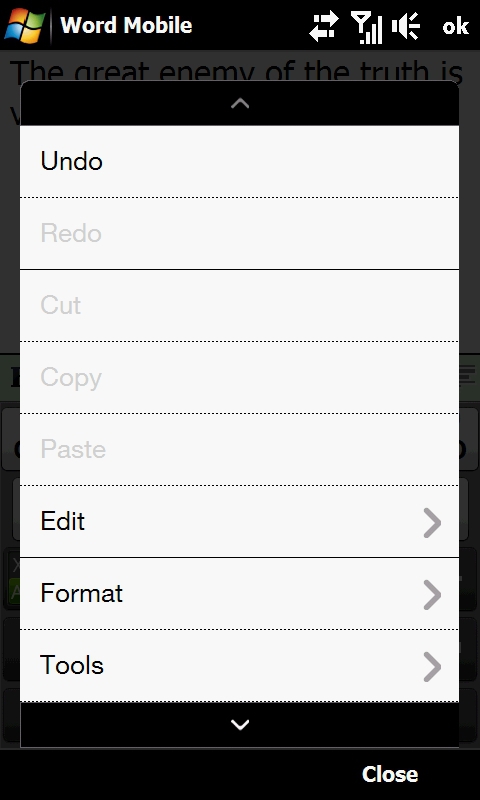
Figure 31: If you can't replace the Office Mobile applications, an enhanced menu system is a bit of an improvement.
One additional step that HTC have taken is to replace menus in standard WinMo applications with larger, touch friendly menus. They've also provided larger status icons that pop up to replace the tiny icons that appear at the top of most WinMo application screens. This will improve as WinMo 6.5 and 7 come out over the next year or so, with touch friendly design at the core of the OS. Until then, HTC's TouchFlo 3D is pretty much the pinnacle of touch friendly experience for WinMo devices.
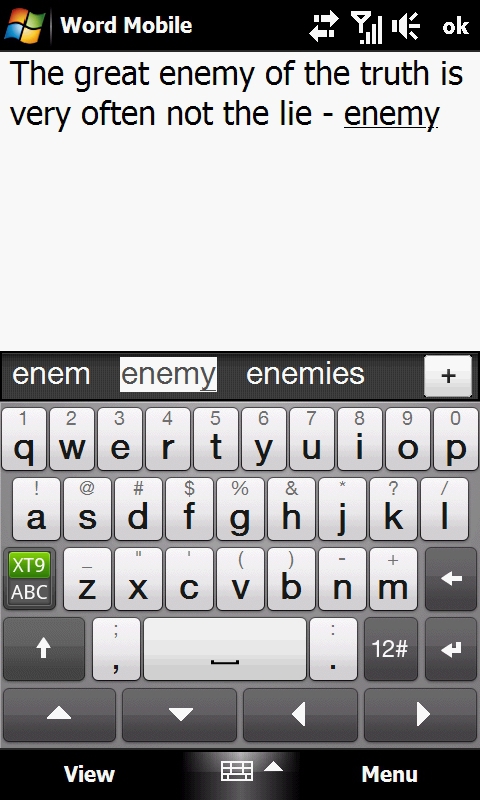
Figure 32: The touch friendly keyboard that HTC includes with the TouchPro2 uses the larger screen to great advantage.
Figure 32 shows the finger friendly keyboard bundled with the Touch Pro2. It's similar to the keyboard that was bundled with the Touch Diamond1 and it was a bit of a struggle to use on that device, mostly because the much smaller screen yielded much smaller keys, resulting in far less accuracy. The larger screen of the Touch Pro2 leads to much better accuracy when using this keyboard. If I owned this phone, however, I would probably replace the bundled keyboard with the superior TouchPal product, which I used successfully even with the Touch Diamond1's smaller screen.
There are also some nicely designed touch enabled 3rd Party applications that can help bridge the gap until native WinMo apps demonstrate a more touch friendly design. Products that come to mind include Calendar Touch from SBSH and Resco Contact Manager.
The Camera
Here's my standard disclaimer for when I talk about cameras in phones… I'm an advanced amateur/Prosumer photographer used to using digital SLRs and high end digital "point and shoot" cameras. I'm quite dependent on features like zoom lenses, fill flash, optical image stabilization, exposure compensation and the like to get the results that I want in my photos. So I'm probably not the most objective person when it comes to evaluating cell phone cameras, which typically lack the features that I rely upon in my dedicated cameras. So let's just suffice it to say that given my personal preferences, you won't be seeing me use a cell phone camera as my primary camera, at least in their current state of development.
But that's not to say that the Touch Pro2's camera can't take some pretty nice photos. The fact that it has autofocus is one feature that takes it a step above most cell phone cameras that have come before it. For technical reasons with which I won't bore you, a camera with autofocus (or any lens that can be focused, auto or manual) can be designed with much more flexibility with exposure than the typical cell phone camera with a fixed focus lens. A major advantage of that flexibility with exposure is that the camera can be set up to work optimally in low light conditions, which can mitigate the lack of a flash to some degree. There are a handful of settings like those found on a dedicated digital camera (white balance, ISO and metering mode, for example) that someone with experience in the nitty gritty of photography could leverage.

Figure 33: Nice colors, decent exposure overall.
In testing, I was able to get some pretty good shots with the Touch Pro2. This photo is an indoor shot with lots of light available. Color is vibrant, but the picture has more noise in it than I'm used to seeing when you blow it up to full size. I was also able to get some fairly good shots in lower light conditions.

Figure 34: Lots of light yielded a nice outdoor shot.
Regardless of the tricks a camera can perform with exposure, you're almost always best off with plenty of light. Some of the best shots from this camera can be achieved on a sunny day outdoors. This shot is probably comparable to what you might be able to get with a dedicated digital point and shoot camera. Unlike with some of the indoor shots, there were no problems at all with noise when you blow the picture up.
The Touch Pro2 can also take videos at up to VGA resolution. The specs list a maximum frame rate of 15 fps, which is a bit on the low side, so fast action probably won't come out at its best and fast panning might result in blur. As a point of comparison, my Canon compact camera can take VGA resolution video at 30 fps, which will do a much better job of capturing action. But if you want to get some action shots at the kids' birthday party in the back yard, the Touch Pro2 is up for it. If you're going to do a lot of videos, though, a dedicated video camera is something you should consider for best results. For the record, that recommendation applies to cameras like my Canon compact as well.
As with the majority of phone cameras, the Touch Pro2 is suitable for general photo use and the occasional video. Assuming you carry your phone with you all the time, the convenience of having its camera available can compensate somewhat for the features that it may be lacking compared to a dedicated camera. I'll still suggest that if you can plan ahead and carrying 2 devices isn't an issue, it's worthwhile to bring a dedicated digital camera to leverage its wider range of features and greater flexibility. That's especially the case if you anticipate some challenging photo opportunities (needing to get closer to something far away, lots of photography in very low light conditions, etc.). If you're on the other side of the gym when your teen graduates from high school, for example, you might regret not having a camera with an optical zoom lens and high ISO settings. But as a camera that you're likely to have with you almost all the time, the Touch Pro2 should give you fine results.






