


Wednesday, July 1, 2009
I Love It When We're Cruisin' Together - the HTC Touch Cruise Reviewed
Posted by Doug Raeburn in "Pocket PC Hardware" @ 07:00 AM
CoPilot
Many WM phones with a built-in GPS rely on Google Maps for navigation. As nice as Google Maps is (especially for a free product), it falls somewhat short of a full navigation package. So the fact that HTC bundled CoPilot Live with the Touch Cruise is definitely a point in its favor.
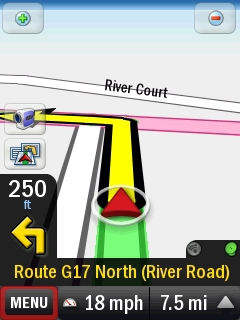
Figure 37: A fairly standard 3-D view.
If you've had experience with any of the navigation software packages available for WM devices or on dedicated navigation devices, you'll find CoPilot to be a comprehensive package. It's very touch friendly, with large buttons, lists consisting of large items, etc. I was a bit disappointed that it doesn't include street names in the voice instructions, however.
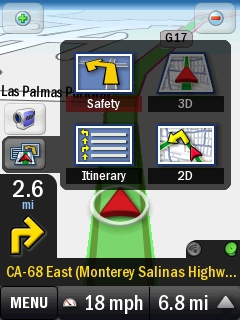
Figure 38: The views are nothing unusual, but it's nice to be able to change them right from the map, rather than digging through layers of settings menus.
As shown in Figure 38, CoPilot includes all of the route and map views that you might expect: 2D, 3D, Itinerary and Safety. Safety is CoPilot's name for a view that appears under other names in other products, consisting of instructions in large text along with an arrow showing the direction of the next turn.
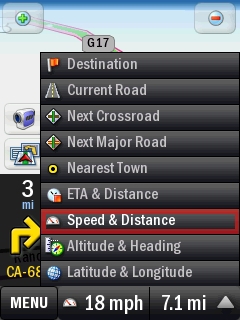
Figure 39: More handy settings available right from the map screen.
You can tailor the information on the screen by choosing the items displayed at the bottom. While other nav programs can do this, you usually have to go several levels deep to a menu to change it. CoPilot has a single menu for this and it's available right from the map screen. So you can go from "speed and distance" to "altitude and heading" in a couple of finger taps.
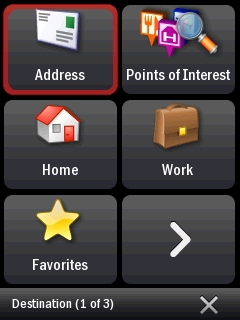
Figure 40: Nice big buttons make it easy to set up your routes.
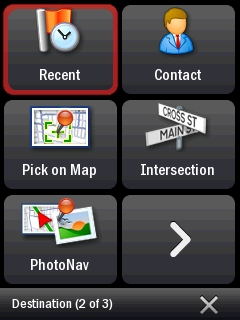
Figure 41: More routing setup options.
Setting up routes is quick and simple. You can enter addresses directly, navigate to an intersection, use a destination that you used before, use the addresses in your contacts, search for a Point of Interest and more. You can include up to 10 destinations in a single trip. You can also allow CoPilot to optimize the route for you by rearranging the order of the destinations. Or you can do that yourself.
A feature unique to the implementation of CoPilot on the Touch Cruise is the PhotoNav feature. It provides the means to select a destination via a photo with GPS coordinates. You can create such photos using the Cruise's camera and taking a "GPS Photo". Then, when you use the PhotoNav feature, CoPilot will identify photos with location information and display them for you to choose.
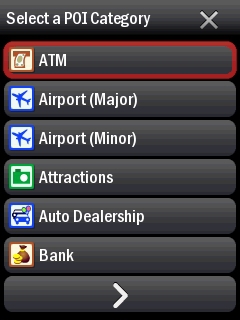
Figure 42: POI categories and more big buttons.
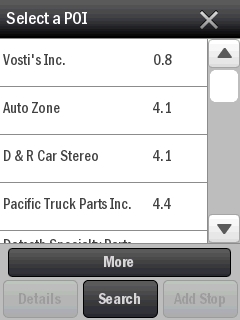
Figure 43: The developers of CoPilot have obviously put a lot of effort into making it touch friendly.
CoPilot includes a comprehensive list of Points of Interest. As in the rest of the product, the POI categories are displayed with large buttons that are easy to select. The same applies to the POIs themselves.
A feature called CoPilot Live adds a number of convenience features. It includes live traffic, and you can even set CoPilot to automatically reroute around traffic tie-ups when it becomes aware of them. And you can set it up to allow friends and family to know precisely where you are when on a trip.
I used the Touch Cruise and CoPilot to navigate from Salinas, CA to Pier 39 in San Francisco during a recent vacation and both performed flawlessly. I was with a friend who had his own idea about the route from previous trips and he was skeptical of the route chosen by CoPilot. "I think it's wrong… the intersection with Hwy 80 was miles ago." However, later he conceded that he didn't know that there was another intersection point with that highway of which he was unaware, and CoPilot had used it in its route. And when we arrived, he admitted that the route that CoPilot had chosen was more direct than the one he had used in the past.
Overall, CoPilot was a nice addition to the software bundled with the Cruise. Since the package alone retails for $99 USD, it's a valuable addition as well.






