


Saturday, June 7, 2008
iPhone Browsing on Windows Mobile? Sure can...with TouchBrowser 1.1.3!
Posted by Don Tolson in "Pocket PC Software" @ 12:12 PM
TouchBrowser provides 3 keyboards for user input (in addition to the ones normally provided in the Windows Mobile O/S). The first is a full screen alphabet with the vowels placed in the top row.
Figure 9: Full screen, alphabet keyboard (vowels first).
This isn't too bad for input, with nice big keys for fat fingers, but it does take a little getting used to if you are a touch typist and expect a typewriter layout. The second is a standard qwerty keyboard which takes up about ½ of a QVGA screen landscape.
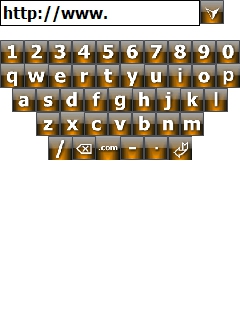
Figure 10: Half screen Qwerty keyboard.
This is better for those of use who like typewriter layout, but I found the keys much too small for accurate and consistent response. I guess this is the trade off for the screen landscape available on a portrait orientation. The last is another full-screen alphabetic, with the numbers on top.

Figure 11: Full Alphabetic keyboard.
Of the three, I only found the vowel-first keyboard at all useful, albeit slower, since I'm used to the QWERTY layout. The keys on TB's QWERTY keyboard were too small for my fingers and having the vowels located at the top of the screen didn't help much.
Conclusions
As mentioned before, I haven't had a chance to work with the browser on the iPhone, so I can't really tell you if TouchBrowser give you a better or even similar experience. So far though, TouchBrowser's gesture support seems limited to dragging around a virtual window and auto-scrolling vertically – some of which can be accomplished with other software tools, like Spb's Pocket Plus. But I have to admit that the overall experience of web browsing with TB is better than PIE. Unfortunately, a number of features (such as Favorites management) still require the stylus, which invalidates the concept of a gesture-based browser. That said however, TouchBrowser is a good start and shows promise for finger-flick browsing in Windows Mobile.
Don is an Associate Director with Fujitsu Consulting, responsible for the Enterprise Mobility practice. He's still waiting for Canada to join the rest of the world for mobile information browsing.....






